Buying 1 Envelope
Your story content will appear here once you provide it.
This will act as my portfolio for EDU-241
For any questions, reach out to me at tomasnelson@gustavus.edu

Throughout this website are various links to projects and resources related to the EDU-241 course. To navigate through my website, refer to the headers at the top of the page.
"The real problem is not whether machines think but whether men do." - B. F. Skinner
"The more we know about how to do something, the harder it is to learn how to do it differently." ― Everett M. Rogers
"Science is what we understand well enough to explain to a computer. Art is everything else we do." ― Donald Knuth
Here is where all of my course projects will be located
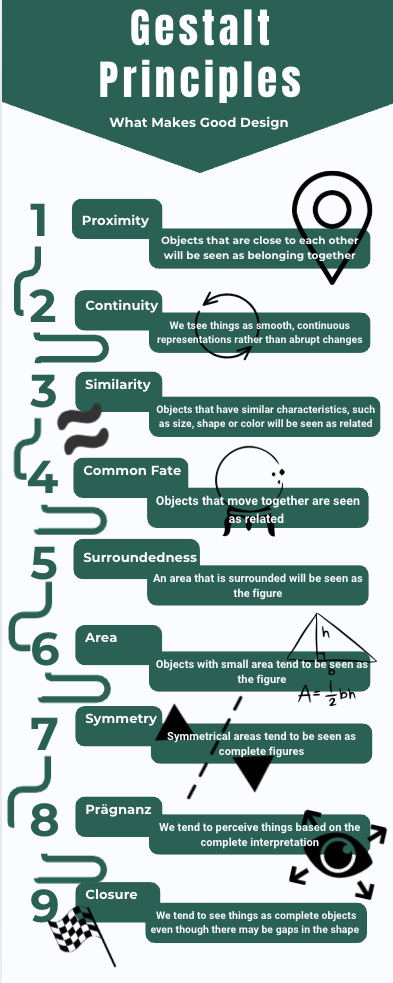
This is my infographic on the Gestalt principles. The Gestalt principles are laws of human perception that describe how humans group similar elements, recognize patterns, and simplify complex images when perceiving objects. We use these to make higher quality and more intuitive products, like an infographic! 2 pros are that it is a great way to present information and can be used to help people understand complex topics. 2 cons are that it can be hard to create and they are information dense. You could use these scattered throughout a classroom where studnet might gaze when they loose attention..
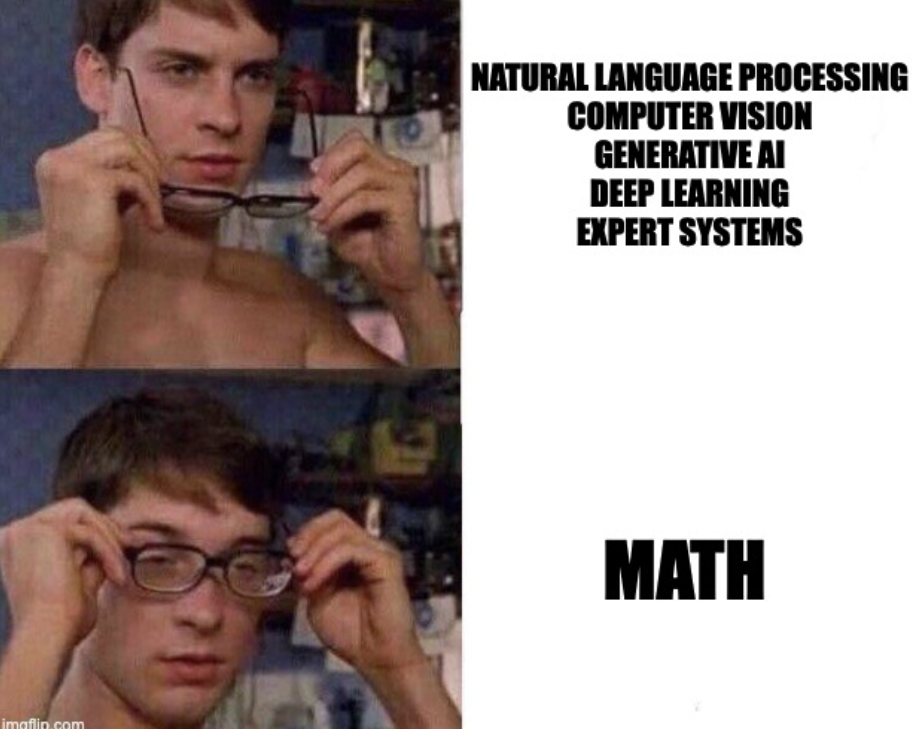
Here is my homemade meme. Machine learning under the hood is just some cool math. 2 pros memes provide are making diffult topics less daunting and providing humor with learning. 2 cons is they might be distracting and hard to implement. These could be used in a presentation or lecture to help engage the audience.
This is my own homemade educational technology. I designed this widget to provide live formative assessments that support real-time instruction. If you are grading this the link will not work if server is not up. I can email a video demo or show in class. By accessing the link, users can participate in a live poll and a chat room for feedback and responses. Two pros of this technology are that it is incredibly intuitive and provides live results based on participants' responses. Two cons are that spam or troll prevention has not yet been implemented—though it would be easy to add—and its functionality is currently limited to chat and voting. I use this tool in a variety of lectures to gather constant feedback, and it is especially helpful for encouraging questions from those who may feel anxious about raising their hand.
Schoology is a cloud-based Learning Management System designed for K-12 and higher ed. It provides course management, assessments, submissions, and communication all within the platform. Two pros to Schoology are the fully integrated learning management system—grades, assignments, communication, and class resources all in one place. Another pro would be cross-platform access. Whether a student is on a laptop or tablet, they have the same accessibility to all of the features of Schoology. Two cons would be that the layout is very rigid, and there is virtually zero customization to the user interface. Second, from experience, syncs can glitch, and uploaded materials on both students' and teachers' ends won't be posted. As far as how I would implement it into a classroom, I think it was, and would continue to be, an effective platform for high school students. It's got all of your things in one place, and it's consistent. Having all of your classes under the same system makes it so once you get the hang of it, you've got everything you need at your fingertips.
YouTube is a widely used online video-sharing and streaming platform that allows users to upload, view, share, and comment on videos. It is one of the largest repositories of educational, entertainment, and professional content worldwide, making it a powerful tool for both personal learning and formal education. YouTube supports high-definition video, playlists, closed captions, live streaming, and community interaction, which makes it versatile for classroom use and professional development. Some pros of YouTube are its vast variety of content and creators, which allows for a wide range of options for learning. Another pro is that features like closed captions and adjustable playback speed make content digestible for everyone. Some cons are the potential distractions of YouTube, as it is one of the most popular content mediums, and ads are constant and can be rather annoying. How I would use YouTube in my classroom is by creating my own tutoring videos similar to those that already exist. There are many YouTube tutors for computer science, but it might be more relatable if I create the content myself—it would be good practice for me as well.

Codedex.io is an online platform that teaches coding through interactive tutorials, challenges, and projects. Its interface is designed to be student-friendly, with guided lessons in Python, JavaScript, SQL, and other programming languages. The site combines text-based explanations, coding exercises, and immediate feedback. The main task they are trying to accomplish is the gamification of learning to code. Some pros are that students practice coding directly in the browser and get instant feedback, which supports active learning instead of passive reading. The platform also uses challenges, levels, and progress tracking to keep students motivated, making coding feel less intimidating. Some cons are that lessons and features are restricted behind a paywall, which could limit accessibility for students in a K–12 setting without school funding. The content is also strong for beginners and hobbyists but may be too much for middle and high school classrooms. In a future teaching context, I could use Codedex.io as a supplemental tool for introducing coding. An example would be assigning short coding challenges as homework or warm-up activities. I could also use the platform during computer lab sessions for self-paced exploration, allowing advanced students to progress faster while beginners get structured guidance.
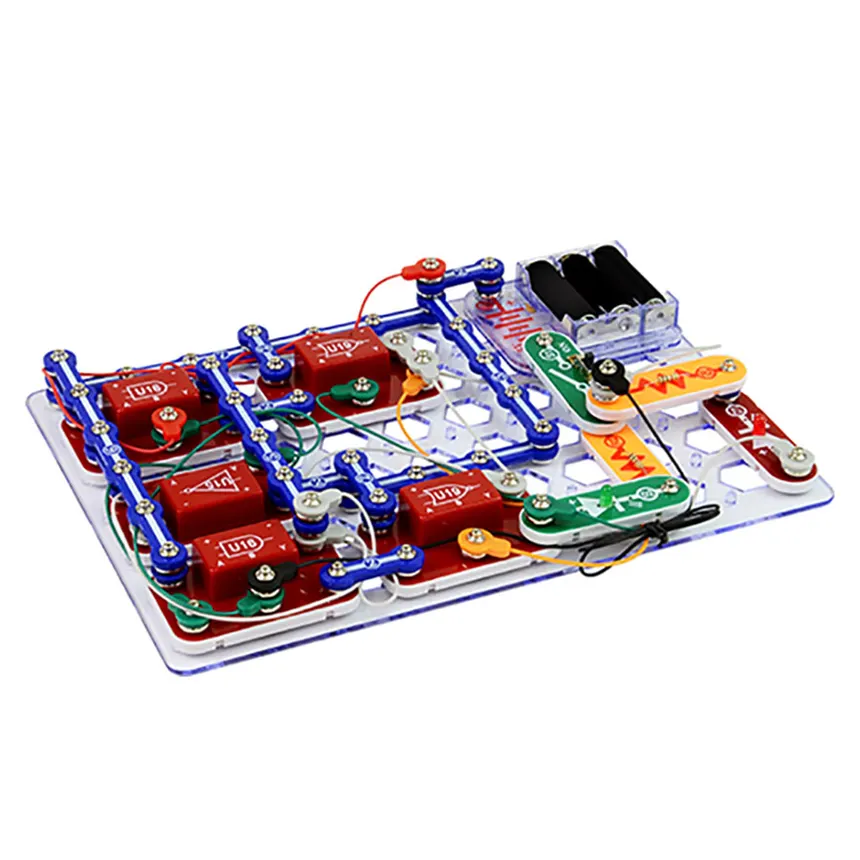
Thinking about ways I could utilize differentiation in my college computer science classroom, I believe open-ended projects designed around the upper levels of a student's Zone of Proximal Development (ZPD) would be highly effective. The ZPD refers to the range between what a learner can do independently and what they can do with guidance. By keeping assignments open-ended, I give students the freedom to demonstrate their knowledge in the way they excel—whether that's analytical, practical, or creative. Pushing students toward the upper end of their ZPD challenges all learners, from those with little prior ability to those who are already comfortable with the content. For example, if I want students to demonstrate their understanding of logic gates, one way I could differentiate for advanced students would be by providing them with an IDE and having them show me logic gates within code or animations. For beginner students, I could have them show me their understanding using physical products like Snap Circuits. In both cases, students are demonstrating their understanding, yet both are being challenged in the demonstration of that learning. I am differentiating by changing the tools—physical for the more intuitive and virtual for the more abstract thinkers. This approach ensures that all students are equally engaged, challenged appropriately, and putting forth comparable effort, while still allowing them to showcase their understanding in individualized ways. There are several advantages to this method. It is equitable, since all students can engage with the content at their own level, and it gives them freedom to demonstrate their knowledge in ways that feel meaningful and authentic. However, there are also challenges. This strategy would require significant effort on my part to review and approve project ideas to ensure they align with the expected level of difficulty. Additionally, I would need to implement some form of formative assessment to gauge where each student currently stands, so that projects can be matched more accurately to their ZPD. Additionally, pushing students towards their end ranges of ZPD would require additional "scaffolding" on my part. Lots of work, but it seems worth it!
Class Type: College Computer Science I
Instructional Style: Hybrid – Flipped Classroom with Stations
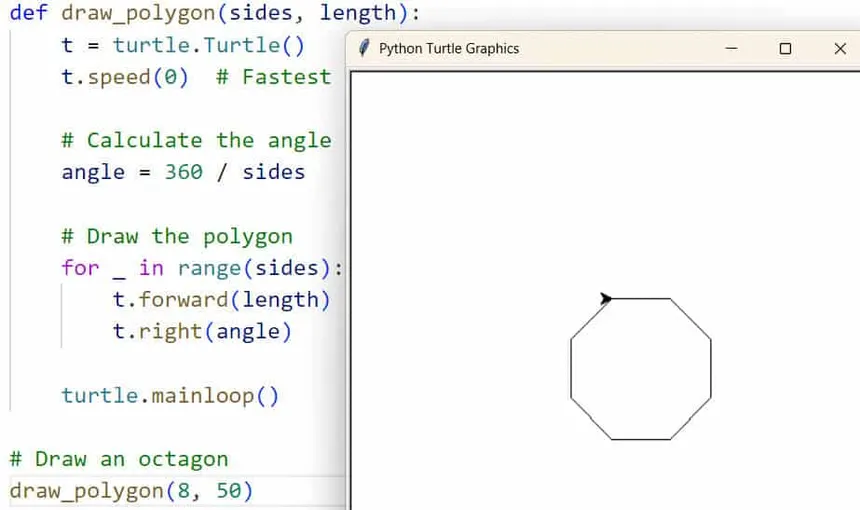
Topic: Python Turtles
Implementation:
Students will first watch short YouTube lessons explaining the Python turtle package documentation. After the video, they will complete a brief formative assessment consisting of one self-reflection question (how confident they feel about the content) and three technical questions to gauge their understanding. This allows me to identify where to allocate classroom time: students who are more comfortable can work independently, while those less confident will receive additional support.
During class, students will work in groups of five at five computer stations (25 students total). Each station will have a Python shell and a blank `.py` file. Groups will be heterogeneous: each will include one student who excels with the material and four members of similar ability levels. This structure provides student to student support while keeping group dynamics manageable.
Within each group, one member will serve as the primary programmer (typing), while the others act as pair programmers providing feedback, suggestions, and problem solving support without using the keyboard. Roles will rotate at each computer so every student has the opportunity to type at least once while still contributing as a supporter for the other problems.
Example Problems:
1. Use Turtles to draw a star.
2. Use Turtles to draw a square and fill it with blue.
3. Use Turtles to write your initials in blue.
4. Use Turtles to draw a house (a square with a triangular roof).
5. Use Turtles to create a simple spiral pattern.
Potential Benefit or Use of AI in Education
I think AI has the potential to make students more curious and independent learners. It can serve as a sort of modern day Library of Alexandria, as an endless source of knowledge for anyone willing to explore. With the right guidance, AI could encourage students to ask deeper questions, experiment more, and take ownership of their learning rather than just waiting for answers from a teacher or textbook. Used thoughtfully, it could make education feel less like memorization and more like discovery.
Potential Challenge of AI in Education
One big challenge is going to be academic integrity. If students can use AI to do all the thinking for them, then assignments will become meaningless. The real solution isn't just policing plagiarism, it's designing work that's too engaging and thought provoking for AI to replace. When assignments ask for genuine creativity, analysis, or reflection, AI becomes a tool instead of a shortcut. If educators focus on making learning more interesting and personally relevant, it will help students develop authentic learning habits and reduce the temptation to let AI do the heavy lifting.
Responsible Integration of AI in a Future Classroom
As a future college computer science instructor, I imagine balancing AI in the classroom will be tricky but doable. My goal would be to create projects that teach core principles like memory allocation, logic, and algorithms in ways that can't be fully automated. For instance, using hands on or real world analogies to explain these ideas before letting students use AI to apply them in code. In this setup, AI becomes more of a collaborator than a crutch.
While some might worry this will create lazy programmers who rely too much on AI for syntax or debugging, I think that's missing the point. The best programmers of the future will be experts in systems thinking and understanding how and why things work while letting AI handle the repetitive or mechanical parts. Renaissance man programmer will be the new hot commodity, and training those skills should be the utmost priority, let AI deal with the technical stuff.

These are my favorite albums. Give one a spin as you explore my website!
Choose from the collection below







For my following an educator assignment, I went a little off the beaten path and chose a nontraditional educator. I picked Nate B. Jones, who covers all things AI from the newest model releases to practical applications developers can actually use. Nate is kind of an OG in the AI space, with over 20 years of industry experience, including time working on major projects at Amazon AWS. I chose him because he's incredibly knowledgeable but also has this rare ability to explain really complex ideas in plain, understandable language. I also appreciate how current and relevant his content is. Every video feels like a direct window into what's happening right now in tech, which helps me stay sharp and engaged as a developer.
"The tech world is changing fast, but that's not something to fear. What stays constant is the value of hard work, curiosity, and adaptability."
My favorite video of his was "The Inside Scoop on Juniors and Jobs in the AI Age." It wasn't his usual breakdown of new models or best practices, but it hit close to home since I'm just starting my career in tech. The job market right now is rough for junior developers and many entry level roles that used to exist have been taken over or reshaped by AI tools. Nate acknowledged that reality, but what I liked most is that he didn't make it sound hopeless. He explained that junior devs today need to bring more to the table than just code. They need curiosity, communication skills, and the drive to keep learning. Companies are looking for people who can grow fast and think critically, not just follow instructions. He also pointed out that there are still plenty of opportunities for people who are willing to be flexible and carve out new paths. That video gave me some much needed perspective and confidence about my future in tech, which is why it stood out to me.
This assignment turned out to be way more valuable than I expected. Watching Nate's videos regularly kept me up to date on AI trends and helped me become a stronger, more informed developer. But more than just technical skills, I learned how to think critically about where technology is heading and how to explain it to others. I've found myself having more conversations about AI and even helping friends understand some of the same concepts I learned from Nate. The biggest takeaway, though, is that the tech world is changing fast, but that's not something to fear. What stays constant is the value of hard work, curiosity, and adaptability. AI might shift the landscape, but the people who keep learning and stay passionate will always find a way to thrive.
Your story content will appear here once you provide it.